Map
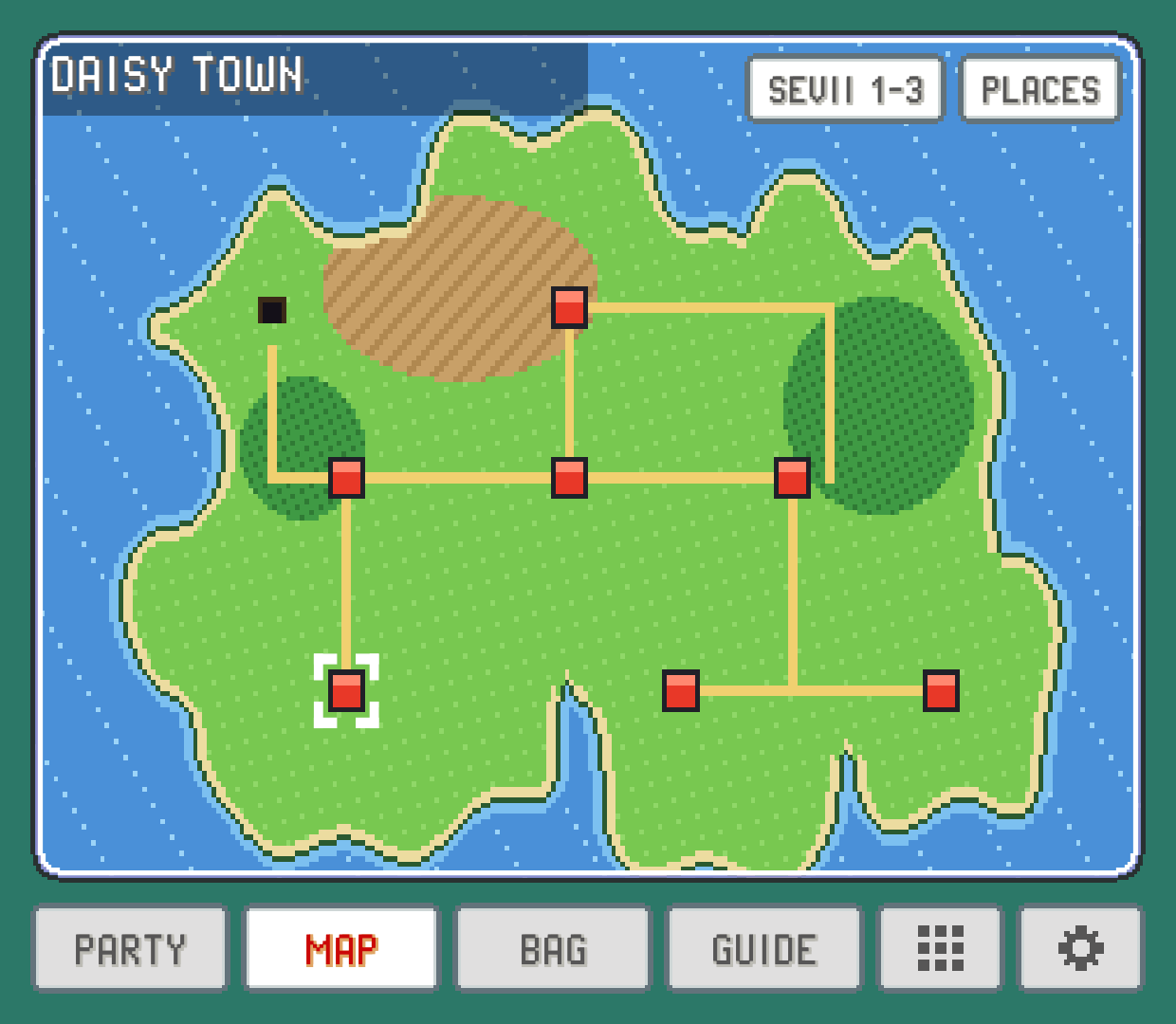
The game's own region map with you on it, a map of the cave or building you're in with all its floors, tapping a spot to name it, and finding any town or route from the PLACES list.
The MAP tab is the game's town map, always open. It answers "where am I?" at a glance and "where is that town the guide mentioned?" in two taps, without digging the map out of your bag.
You on the map
The map is drawn the way your game draws it: the region's own picture, your character's head on the tile where the game would put it, and the game's blinking cursor around the place you're in. The place's name sits in the game's own label: a dark strip in the top left in FireRed and its relatives, a framed window in the bottom right in Emerald and its relatives. In FireRed-style games a second strip names a cave or other place on that spot when there is one.
Indoors and underground, the head stays on the last outdoor spot you were on, like the game does. In the games that have one, a cave or a building gets a map of its own instead: see below.
The cursor pulses between two sizes like the game's. To keep it still, turn off MAP CURSOR BLINK in SETTINGS > TWEAKS.
Caves and buildings: the AREA map
In the GBA games (FireRed, LeafGreen, Emerald, Ruby, Sapphire in every language, and most hacks), walking into a big cave or building switches the MAP tab to that place's own map: the whole floor you're on, drawn from the game itself, with your head where you stand. The place's name and the floor sit in the bar at the top. A place counts as big when one of its floors is at least two screens wide or two screens tall, or holds more than three screens of room: caves, hideouts, towers, ships and the puzzle gyms.
A row of buttons under the map has one for each floor. Yours has a pin on it. Tap another floor to look around it, and
MEto come back to yours. When you take the stairs, the map follows you. In a place with many floors, slide the row to reach the rest.Floors are named the way the game names them (
B1F,1F,5F,RFfor a rooftop). Where the game doesn't name them, they're numbered in the game's own order. Some caves have more than one part on the same floor: those show as3F,3F-2and so on.The magnifier shows the map at the game's own size around you. Drag it to look around, and tap the magnifier again to see the whole floor.
REGION MAPtakes you to the region map, andAREA MAPthere takes you back. Your pick holds until you leave for somewhere else; the next cave or building starts on its own map again.
The HUD's minimap follows the same pick: in a big cave or building it shows the floor around you, zoomed out to about three screens of it, with the floor's name next to the place's. Tap it for the whole floor.
Pokémon Centers, shops, houses, department stores and the small gyms keep the region map, however many floors they have. So does a small room inside a big place, like a ship's cabin or an elevator: AREA MAP on the region map still opens the place's map from there. The Game Boy and DS games, and a few hacks, keep the region map everywhere for now.
Tap a spot to name it
Tap anywhere on the map to move the cursor there and see what it is. The label shows the place's name and the cursor frames all of it, so tapping one end of a long route highlights the whole route. Tapping the sea or empty land shows no name.
When the cursor isn't on you, a ME button appears, including after selecting an empty tile on Linux or 3DS. Tap it, or tap your character's head, to put the cursor back on where you are.
PLACES: find any town or route
Tap PLACES for a list of every place on the game's maps:
YOUR LOCATIONat the top takes you back to yourself.TOWNS & CITIES, in the order the game lists them.ROUTES, by number.OTHER PLACES(caves, forests, towers and the like), A to Z.
Pick one and the map shows it with the cursor on it. This is the quickest way to answer "where is that?" when the Guide or an in-game character mentions somewhere you haven't been.
More than one map
Some games have more than one map. In FireRed and LeafGreen, for example, the Sevii Islands are on maps of their own. Those games get a region button next to PLACES, named after the next map (SEVII 1-3, SEVII 4-5, SEVII 6-7, back to KANTO); Gold's, Silver's, Crystal's, Crystal Legacy's and Crystal Clear's are JOHTO and KANTO; Prism has six, NALJO, RIJON, JOHTO, KANTO, SEVII and TUNOD; Polished Crystal has JOHTO, KANTO and ISLANDS (the Orange Islands); in other games the maps are numbered. Tap it to flip through them. When you're on another map than the one shown, ME brings you home.
In Crystal Clear you design your own character, and in Prism you pick one of six, so the map doesn't draw you: the cursor and the place name still show where you are. Polished Crystal draws you in the look you picked at the start, as its own map does.
In the PLACES list, places that aren't on the first map say which map they're on.
Flying to a town
When someone in your party knows the move that carries you between towns, a blue button for it appears under PLACES. Tap it for the towns you can fly to right now, pick one, and the game takes you there with its own animation, just as if you'd used the move from the party menu. With NO HMS NEEDED on, the badge is enough: the button shows even when nobody knows the move, and your first Pokémon carries you. In a game whose own party menu lets a Pokémon fly without knowing the move (Unbound: once you can fly there from the party menu), the button follows the game and the Pokémon its menu would pick carries you.
The game's own rules still apply: you need the badge that allows it and you have to be outdoors, walking around, with no menu or conversation open. If something's missing, the button tells you what instead of flying.
It works in FireRed, LeafGreen, Emerald, Ruby and Sapphire in every language and on these hacks: Unbound, Radical Red, Ultra Violet, Let's Go, Gaia, Odyssey, Amethyst, Sword and Shield Ultimate Plus, Orange Islands, Glazed (its first region), Emerald Legacy, Heart and Soul, SoulGold, Lazarus, Emerald Imperium, Emerald Seaglass, Too Many Types 2, R.O.W.E., Super Mariomon (1.5.1 and 1.5.2), Quetzal (Alpha 9, Hoenn's towns), Epsilon Emerald (the routes you've been to are on its list too, as in the game), Rocket Edition, Ash Gray and Emerald Kaizo (over the map only, see below). Emerald Rogue doesn't let anyone fly, so it has no button.
On the Game Boy it works in Red, Blue, Yellow (in every language), Yellow Legacy, PureRed, PureBlue, Brown, Crystal and Crystal Legacy. The list is the one the game's own map would give you: in Red, Blue, Yellow, Yellow Legacy, PureRed and PureBlue every town you've been to, in Brown the places you've been to in the order its own map lists them, and in Crystal and Crystal Legacy the towns you've been to in the region you're in (Kanto's once you've reached the Indigo Plateau).
On the DS it works in Platinum, HeartGold, SoulSilver, Black, White, Black 2 and White 2. Black, White and their sequels ask for no badge: once someone knows the move, every town you've arrived at is on the list.
Flying over the map
In FireRed, LeafGreen, Ruby, Sapphire and Emerald in every language, Emerald Legacy, and the hacks Radical Red, Unbound, Glazed, Ultra Violet, Orange Islands, Let's Go, Odyssey, Gaia, Amethyst, Sword and Shield Ultimate Plus, GS Chronicles, Rocket Edition, Ash Gray, Emerald Kaizo, Emerald Imperium, Emerald Seaglass, Too Many Types 2, R.O.W.E., Super Mariomon, Quetzal, Lazarus, Heart and Soul and SoulGold, a second blue button sits under the first one: TAKE OFF. Your Pokémon's bird swoops in, you climb on, and you can fly anywhere the game's world goes: over trees, mountains, water and buildings, from one route into the next town, with the D-pad. Hold A to fly faster. Nothing happens on the way: no wild Pokémon, no trainers spotting you, no doors pulling you in.
Rather ride something else? FLY ON, in SETTINGS under MAKEOVER, swaps the bird for an air balloon, a helicopter, a zeppelin or a small plane, with you inside. See FLY ON.
Your shadow follows on the ground below, clouds drift by between you and the ground (faster than the ground, as they're nearer), and the bird leans the way you're flying: nose up on the way north, down on the way south, a little on a diagonal. Flying on a diagonal is about as fast as flying straight. With ASPECT set to EXPAND, flying on a diagonal glides smoothly instead of stepping a tile at a time.
Press B (or tap the button again, which now says LAND) to come down. The bird finds the nearest spot you could walk on, flies you there and lands; if there's no ground anywhere near, you hear a buzz and keep flying, so head for land and try again. You can't fly past the edge of the game's world: the bird just turns.
In games where a Pokémon walks behind you, it goes back to its ball as you take off, as it does for the game's own flight, and comes out again at your first steps after landing.
It needs what the game's own flight needs: the badge, a Pokémon in your party that knows the move (any Pokémon with NO HMS NEEDED on), and being outdoors on foot (not surfing). On your bike, you get off first and then take off. It's also a tile in the quick menu and a hotkey, FREE FLIGHT, that you can give a button in HOTKEYS. A save state made in the air brings you back in the air.
Where you can fly
FLIGHT AREA (in SETTINGS, under GAMEPLAY) keeps flying from skipping the story. On VISITED, the default, you fly only over places you've already been. At the edge of a place you haven't been, the bird turns back and a note says you haven't been there yet. That way you can't fly past a guard, a sleeping giant blocking the road or a cave you haven't made it through yet.
PokeDaisy keeps a list of the places you've been for each save, and it grows by itself as you walk. The first time it meets a save, it fills the list from what the save already shows:
every town you can fly to,
the routes between two of those towns, since you crossed them to get there,
every place where you've beaten a trainer, when it's next to one already on the list.
So a save from late in the game flies almost everywhere right away. A place with no town and no trainer, or one you skipped, needs one walk in before you can fly over it. The list is PokeDaisy's own: your save doesn't change.
On ANYWHERE, you can fly wherever the game's world goes. If you're signed in to RetroAchievements, achievements pause the first time you take off this way, since flying ahead could reach a set's places early. They come back on when you switch to VISITED again.
The scenic way follows the same rule: a town you can't reach over places you've been gets the game's own flight instead.
The scenic way
In a game that has it, flying to a town doesn't cut to the game's animation: you take off where you stand and fly there over the real map, the place names showing as you cross into each one, and land in front of the town's Pokémon Center. With ASPECT set to EXPAND the view zooms out while you fly, so you see more of the land going by, and the trip runs at double speed.
After your first flight like this, a card asks whether to keep it. KEEP IT (or leaving the card until it goes) keeps it; USE CLASSIC goes back to the game's own animation. You can change it any time with FLY STYLE (in SETTINGS, under GAMEPLAY): SCENIC flies over the map, CLASSIC is the game's own way.
In Emerald Kaizo, FLY always flies over the map, whatever FLY STYLE says (the game's own flight animation isn't offered there), and a town you can't reach that way says so.
A town you can't reach over land and sea from where you are (one behind gatehouses, one you only reach by diving, or another island group) gets the game's own flight instead. SCENIC works in the games that have TAKE OFF; other games always fly the classic way.
Which games get a picture
No game art comes with PokeDaisy. The map picture is rebuilt from your own ROM, once, the first time you play a game, and kept after that. So the very first time, the map can take a moment to appear.
FireRed, LeafGreen, Emerald, Ruby and Sapphire use their region's own map.
Many hacks have their own region drawn into the ROM, and get it: Unbound, Radical Red, Gaia, Odyssey and other FireRed-based hacks, plus hacks like Lazarus, SoulGold, Heart and Soul, Glazed, Quetzal and Wishes of Tomorrow. Monomyth shows the map its PokeNav has. Quetzal Alpha 0.8.4 (and Moemon Quetzal) is Hoenn only and shows the Hoenn map.
Hacks that kept the original map use FireRed's or Emerald's.
Quetzal shows the map of the region you're in: Hoenn, Johto, Kanto or the Sevii Islands. Its region button flips between them.
When there's no picture for a game (or for the area you're in), the tab shows the place's name and your position as text instead.
Something wrong or missing here? Edit this page on GitHub or tell us.